nvim <——> term
I’m a bit of a tinkerer when it comes to tools that I’ve used consistently throughout the years. Recently I thought it might be fun to use nvim as my default terminal environment. Fairly quickly I ran into instances where some tools I use would invoke $EDITOR or I’d try to run nvim while already inside nvim and this would result in a nested nvim instance. Not a big deal but it did feel like a scuff mark on my fortress of solitude. I was aware that git plugins I’ve used somehow manage to handle this gracefully so I decided to have a closer look.
How it’s done - mini.git
The author of the mini.nvim plugins is an nvim team member and prolific plugin creator so I was very interested in their approach. mini.git creates a Lua script that will fire an RPC request back to the nvim instance that created the script. This request calls a Lua function with arguments indicating the file to edit and the socket of the nvim instance that sent the request.
  -- Start editing file from first argument (as how `GIT_EDITOR` works) in
  -- current instance and don't close until explicitly closed later from this
  -- instance as set up in `MiniGit._edit()`
  local lines = {
    'lua << EOF',
    string.format('local channel = vim.fn.sockconnect("pipe", %s, { rpc = true })', vim.inspect(vim.v.servername)),
    'local ins = vim.inspect',
    'local lua_cmd = string.format("MiniGit._edit(%s, %s)", ins(vim.fn.argv(0)), ins(vim.v.servername))',
    'vim.rpcrequest(channel, "nvim_exec_lua", lua_cmd, {})',
    'EOF',
  }
  vim.fn.writefile(lines, H.git_editor_config)
The script is invoked by setting the GIT_EDITOR variable to start an nvim instance that runs without a UI and only loads the aforementioned script.
  -- NOTE: use `vim.v.progpath` to have same runtime
  local editor = H.cli_escape(vim.v.progpath) .. ' --clean --headless -u ' .. H.cli_escape(H.git_editor_config)
The requested function will then open the requested file in a new buffer and register a cleanup function using the magic of autocommands. Once the relevant event is fired the cleanup function will instruct the nvim instance that made the request to qa!.
  -- Create a private function responsible for editing Git file
  MiniGit._edit = function(path, servername)
    -- Define editor state before and after editing path
    H.skip_timeout, H.skip_sync = true, true
    local cleanup = function()
      local _, channel = pcall(vim.fn.sockconnect, 'pipe', servername, { rpc = true })
      pcall(vim.rpcnotify, channel, 'nvim_exec2', 'quitall!', {})
      H.skip_timeout, H.skip_sync = false, false
    end

    -- Start file edit with proper modifiers in a special window
    mods = H.ensure_mods_is_split(mods)
    vim.cmd(mods .. ' split ' .. vim.fn.fnameescape(path))
    H.define_minigit_window(cleanup)
  end
This causes the $GIT_EDITOR to exit with code 0 and everyone is happy. This approach feels a bit funny but I guess the alternative would be implementing your own server that speaks MessagePack, runs everywhere nvim does, and wiring up the nvim RPC API which is slightly not spec compliant. So… I guess this approach actually makes a lot of sense.
So now what?
While I originally just wanted to avoid nested nvim instances, this gave me some other ideas related to having “completion as a substrate”. Would it be enjoyable to make use of a tool like mini.pick to search through my shell history? Let’s wire it up and see what happens.
There’s just a few extra bits of knowledge we need to make this work:
- We can (ab)use fish shell’s command lookup to register fish functions that will take precedence over everything else in
$PATH. Useful when you want to change the behaviour of a command if you detect that you are running from within nvim. - The nvim terminal environment sets its
servernamein the$NVIMenvironment variable.
So with a little bit of plumbing we can connect fish
function hh
»       if test -n "$NVIM"
»       »       command nvim --clean --headless -u ~/.local/bin/command.lua $NVIM "history" &
»       end
end
to an nvim instance that exists only to send a single RPC request
local pipe = vim.fn.argv(0)
local command = vim.fn.argv(1)
local channel = vim.fn.sockconnect("pipe", pipe, { rpc = true })

if command == "history" then
»       vim.rpcrequest(channel, "nvim_exec2", "History", {})
end
vim.cmd('qall!')
that will invoke mini.pick with our shell history and print our selection back to the terminal.
M.history = function(command_args)
»       pick.builtin.cli(
»       »       { command = { 'fish', '-c', 'history' } },
»       »       { source = { choose = H.print_to_term } }
»       )
end

M.setup = function(opts)
»       vim.api.nvim_create_user_command("History", M.history, {})
end
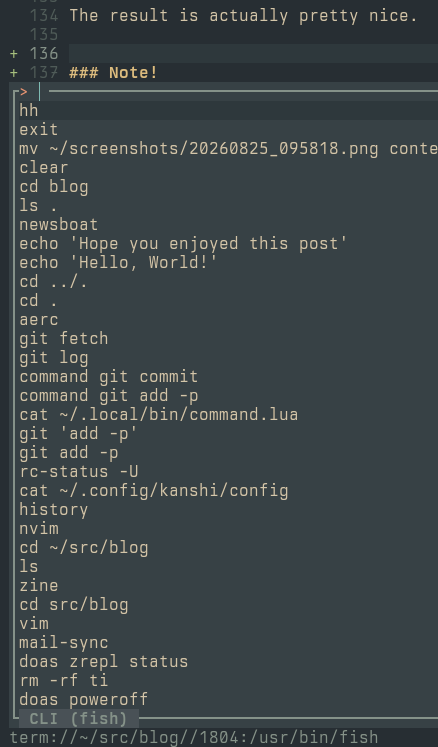
The result is actually pretty nice.
Note!
- I did end up solving my original problem but that felt less interesting to include.
- I’ve omitted a chunk of boring code for brevity. Maybe someday I’ll push up the repo when I’m happy with it.
- Note the usage of
commandin my fish function. That one can be important to avoid potential infinite loops… Which I may have learnt first hand.
What else could I have done?
> Just use terminal mode bindings!
I use space as my <leader> key. Having that be part of my terminal bindings causes annoying stutter when I’m typing.
> Just escape to normal mode and use your existing bindings!
Is that fun?
There is some tension between moving more shell into nvim instead of bringing nvim into the shell. Let’s see where this takes us.
Happy hacking,
ptrckd